
Desk of Craig

Design Experiments
Not everything is part of a larger project or work related. Sometimes it is a good idea to make some of your ideas real so you can flex some creative muscles & work out some details.
Markup Notes
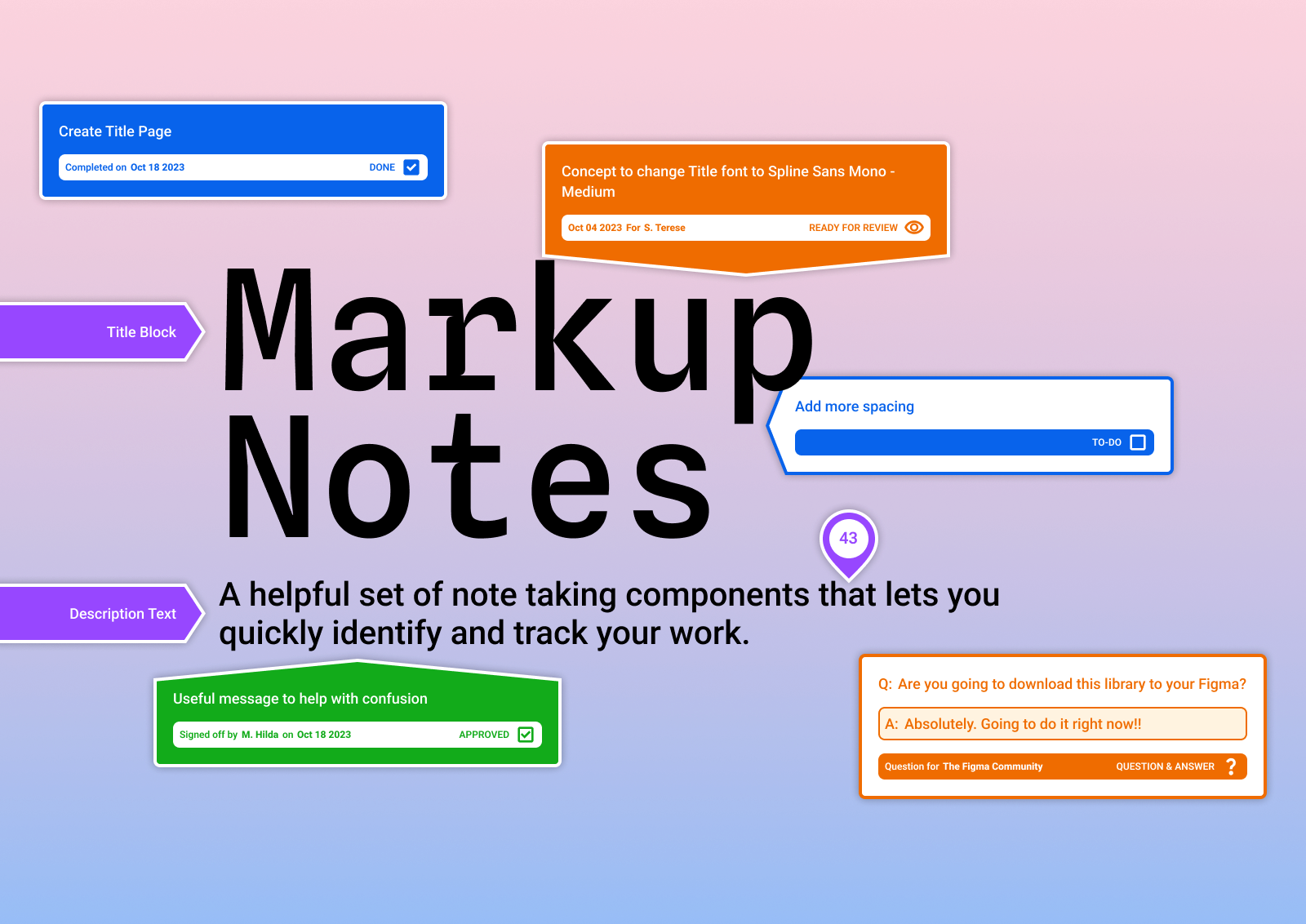
While engaged with a client, the design team I was embedded in was having issues with visibility of decisions, tasks and sign-offs to do with the designs. These challenges led to me to create the Markup Notes file.
This file can be duplicated from the Figma Community and published as an Asset Library within clients or companies to give better visibility within the design file for team or individual usage.
Figma community file can be viewed here.
Figma Prototype Calculator
In 2023 at Config, Figma announced and launched a range of new features to the Prototyping tool. To help myself learn and understand these new concepts and tools, I set myself a challenge to create something.
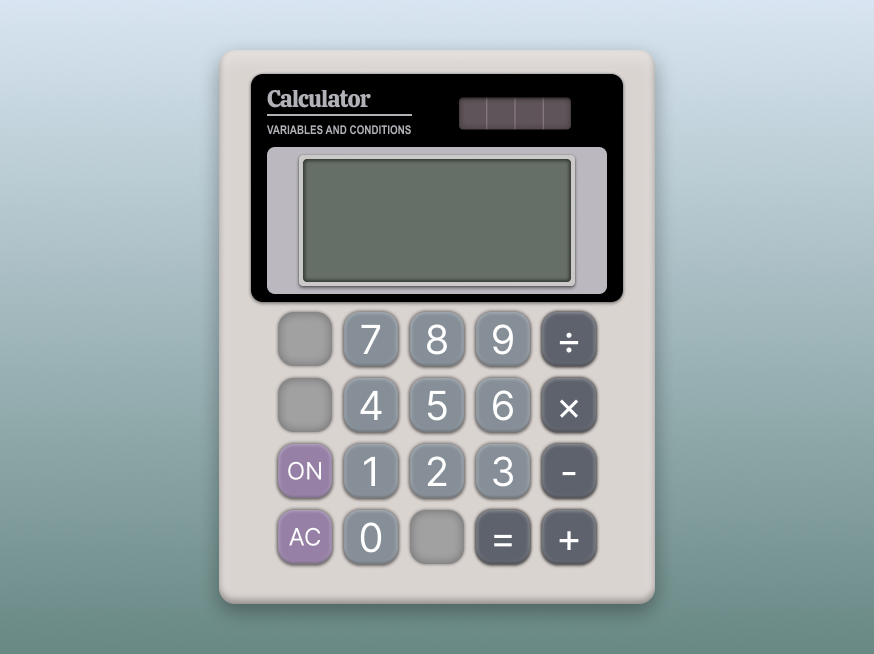
This ended up as a functional calculator that can be run with Figma as a prototype. As well as learning the new tools, I dug into the visual side and used a classic calculator design, the Canon LS-82Z as inspiration.
Figma community file can be viewed here.
The Color Library
At the time of creation, I was working on client designs where two points of interest and concern kept on arising:
- They were using a UI framework to build out their product or system, and
- They were having trouble deciding on semantic colour choices within their product or systems that met WCAG AA Contrast Standards.
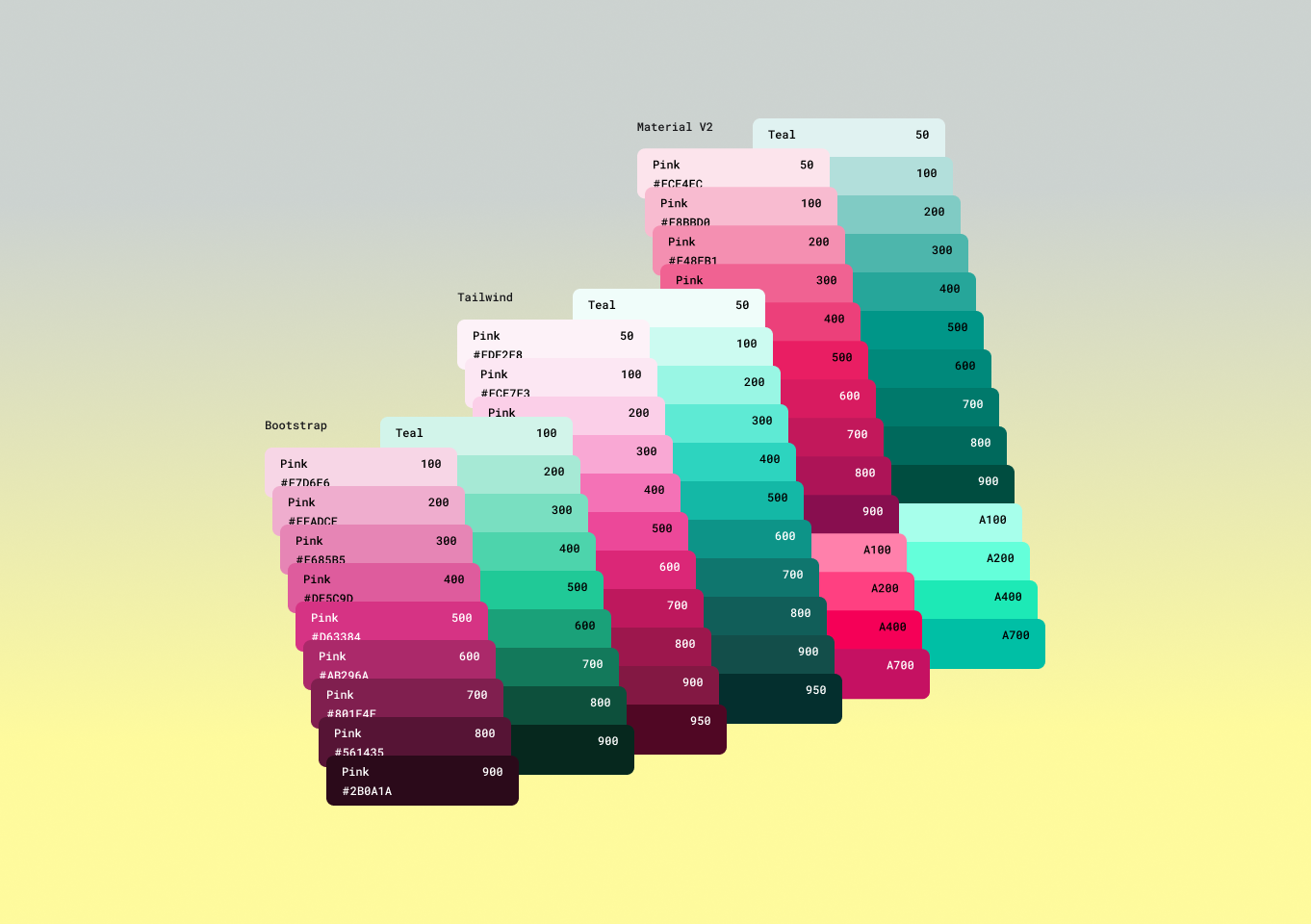
In response, I went to Figma Community to look for colour libraries for our most commonly used frameworks and found the available options very lacking. After noticing a gap, I began work creating a universal colour library which is a collection of 3 of the more proper frameworks base colour palettes and defined them all as variables for tokenisation, as well as swatch cards for visual identification.
This library can be downloaded from the Figma Community and published as an Asset with Figma to give access to this palettes where required, or can copy and paste a section as required.
Figma community file can be viewed here.
Apple System Colors Library
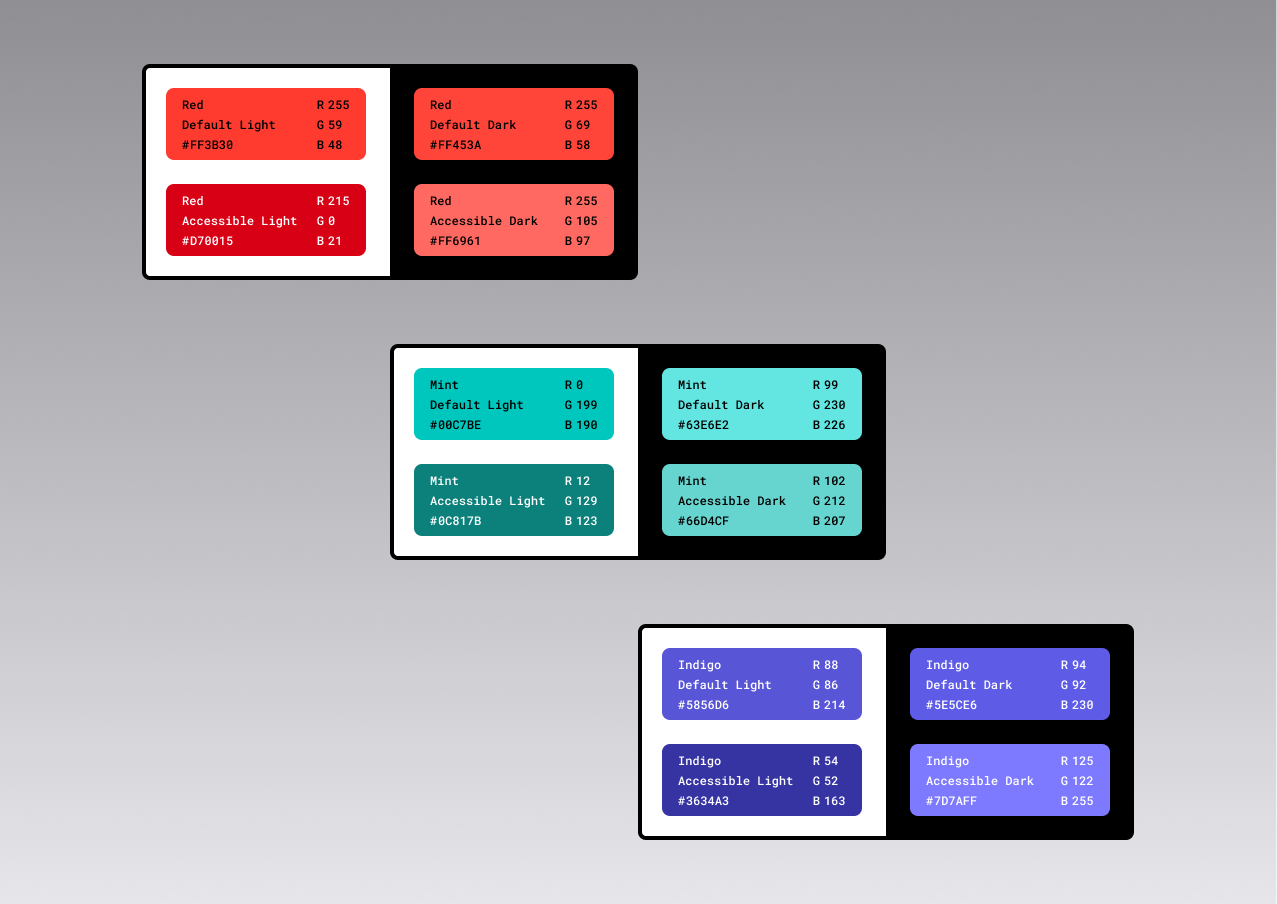
Much like The Colour Library mentioned above, this Community File was created to help fill a gap. Though this selection of colours is a collection of the Apple system colours, the other benefit is that Apple has clearly defined colour for light and dark mode, as well as default and high contrast.
This library can be downloaded from the Figma Community and published as an Asset with Figma to give access to this palettes where required, or can copy and paste a section as required.
This library has mapped out all the Apple system colours across all their devices and use cases. But they have the advantage of being set up using the “Modes” feature in Figma Variables so Light and Dark modes are click away as well as default and high contrast modes.
Figma community file can be viewed here.
Vector Dot Countdown Timer
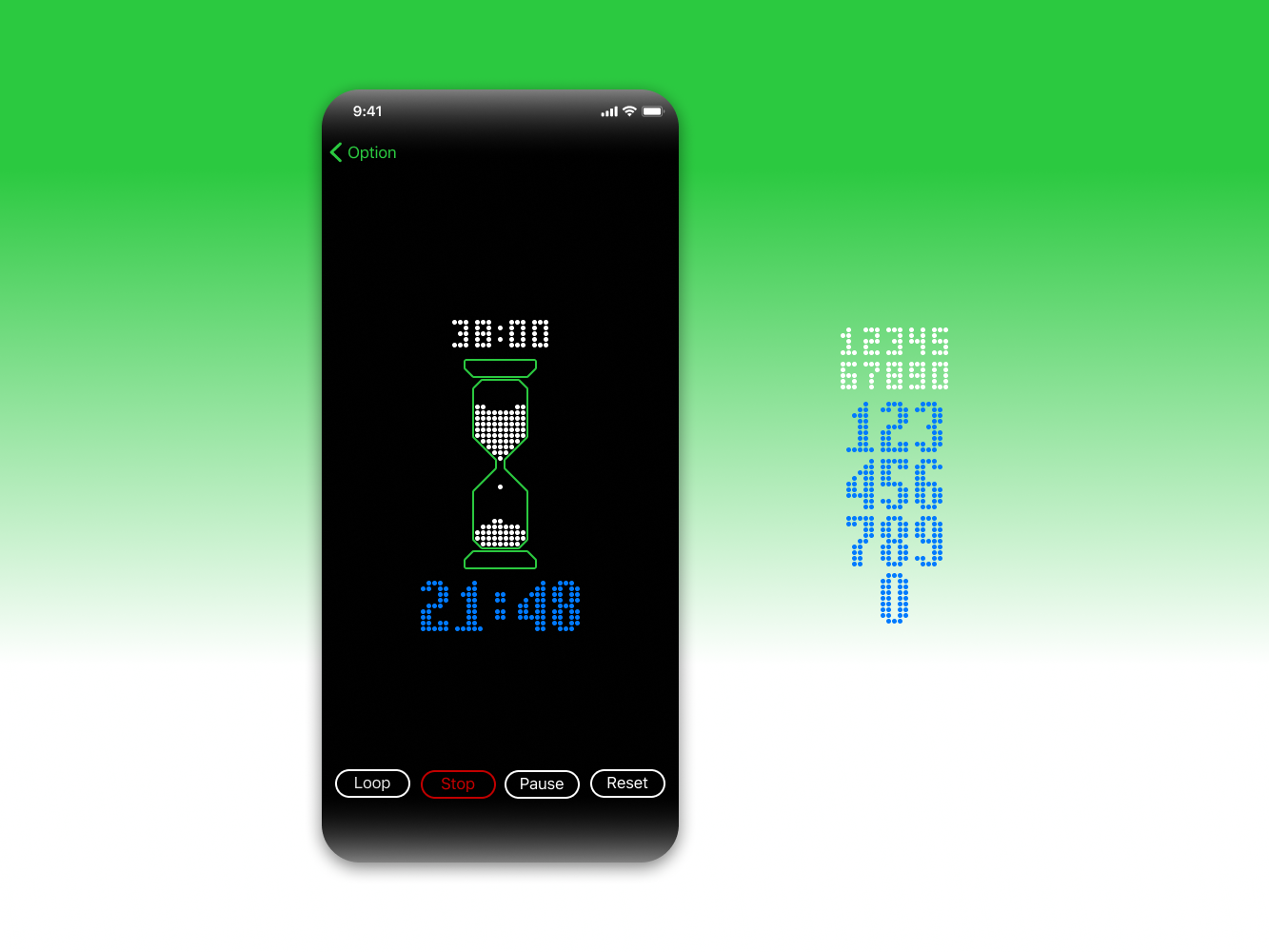
A simple countdown timer display that takes inspiration from 80’s vector graphics and the classic appearance of an hourglass.
Countdown length in indicated at the top of the hourglass where the ‘sand’ originates. Each elements of ‘sand’ is representative of one per cent of the countdown length. The bottom timer indicates the time remaining.
Audio Player Interface
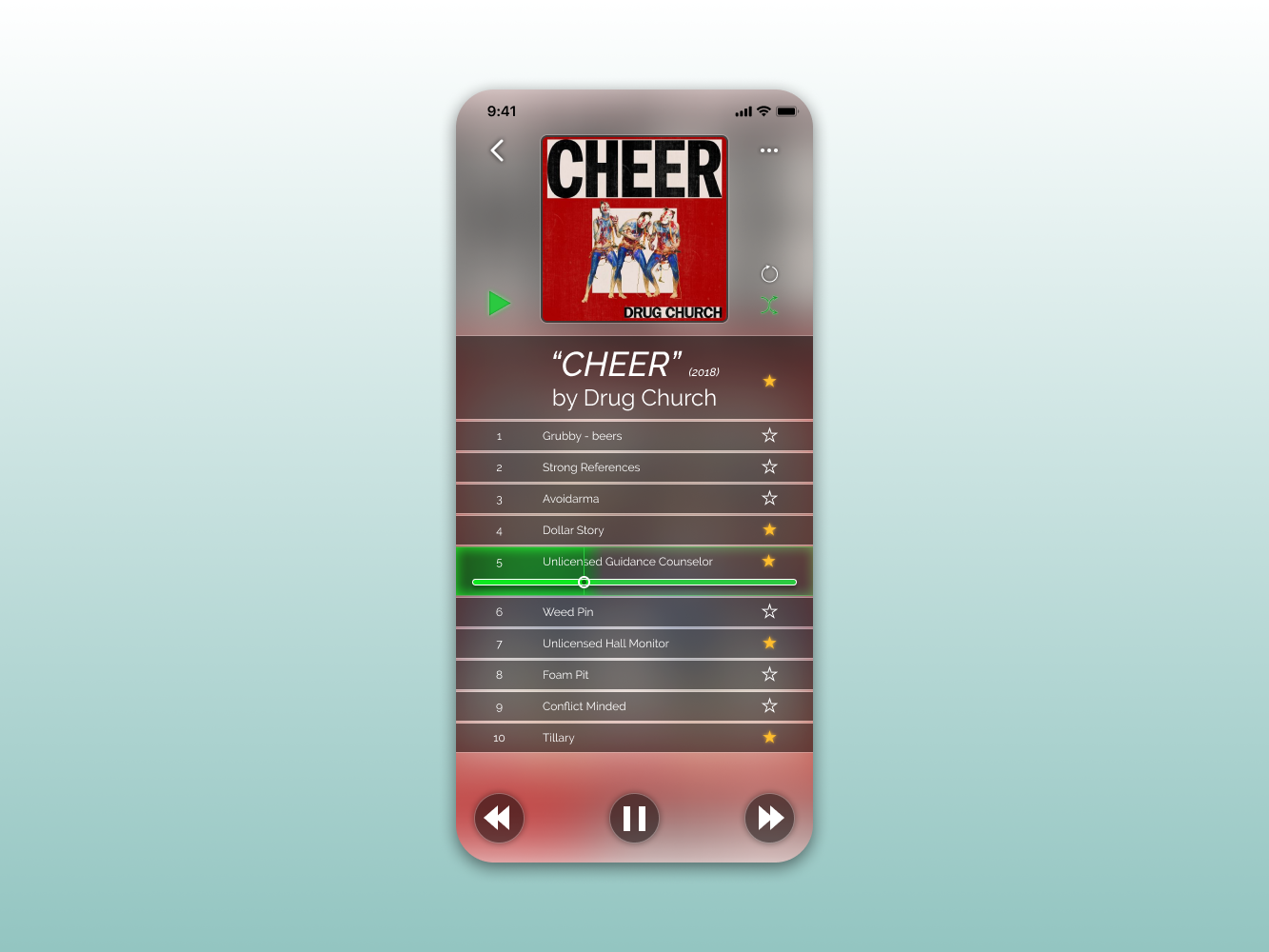
Here I have designed an audio player interface that does not rely on the use of time. The interface gives the user the ability to cleanly see the current artist, album and track.
By not focusing on the duration and current time of a track, a progress bar is used to indicate the position of the track you are listening to.
Promotional Website Landing Page
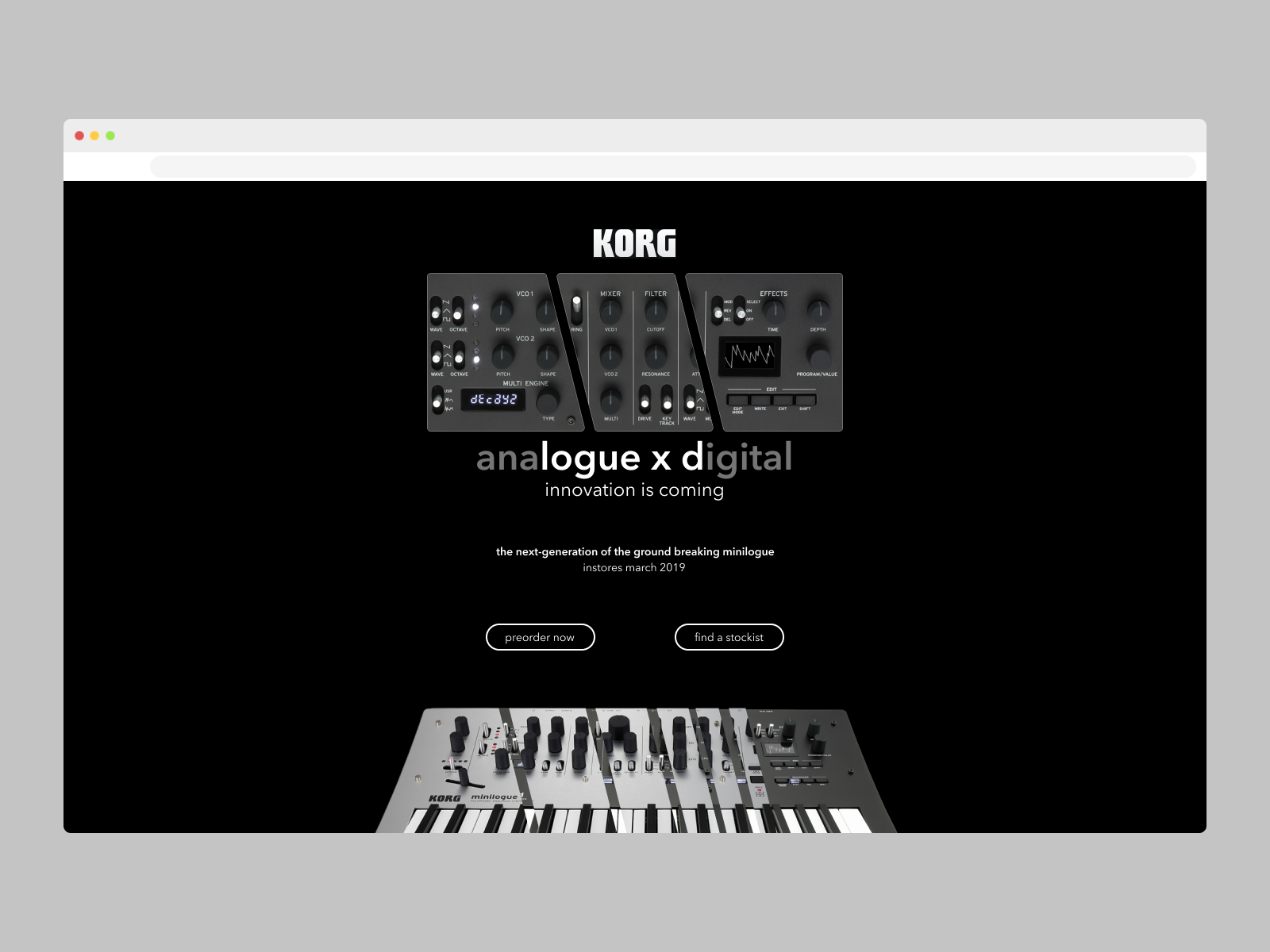
An exercise in a new product release that was to update a current instrument platform with new features, while still maintaining the same design. This experiment aimed to focus on the features being added and the transition from one product to another in the Korg catalogue.
The Korg Minilogue was a game-changer in the synthesiser world. The Minilogue offered a rich-sounding analog synth and deeply featured platform at a low price point. Its successor of types, the Minilogue XD added to that platform offering more features and tonal compatibilities.

Desk of Craig
Design Experiments
Not everything is part of a larger project or work related. Sometimes it is a good idea to make some of your ideas real so you can flex some creative muscles & work out some details.
Markup Notes
While engaged with a client, the design team I was embedded in was having issues with visibility of decisions, tasks and sign-offs to do with the designs. These challenges led to me to create the Markup Notes file.
This file can be duplicated from the Figma Community and published as an Asset Library within clients or companies to give better visibility within the design file for team or individual usage.
Figma community file can be viewed here.
Figma Prototype Calculator
In 2023 at Config, Figma announced and launched a range of new features to the Prototyping tool. To help myself learn and understand these new concepts and tools, I set myself a challenge to create something.
This ended up as a functional calculator that can be run with Figma as a prototype. As well as learning the new tools, I dug into the visual side and used a classic calculator design, the Canon LS-82Z as inspiration.
Figma community file can be viewed here.
The Color Library
At the time of creation, I was working on client designs where two points of interest and concern kept on arising:
- They were using a UI framework to build out their product or system, and
- They were having trouble deciding on semantic colour choices within their product or systems that met WCAG AA Contrast Standards.
In response, I went to Figma Community to look for colour libraries for our most commonly used frameworks and found the available options very lacking. After noticing a gap, I began work creating a universal colour library which is a collection of 3 of the more proper frameworks base colour palettes and defined them all as variables for tokenisation, as well as swatch cards for visual identification.
This library can be downloaded from the Figma Community and published as an Asset with Figma to give access to this palettes where required, or can copy and paste a section as required.
Figma community file can be viewed here.
Apple System Colors Library
Much like The Colour Library mentioned above, this Community File was created to help fill a gap. Though this selection of colours is a collection of the Apple system colours, the other benefit is that Apple has clearly defined colour for light and dark mode, as well as default and high contrast.
This library can be downloaded from the Figma Community and published as an Asset with Figma to give access to this palettes where required, or can copy and paste a section as required.
This library has mapped out all the Apple system colours across all their devices and use cases. But they have the advantage of being set up using the “Modes” feature in Figma Variables so Light and Dark modes are click away as well as default and high contrast modes.
Figma community file can be viewed here.
Vector Dot Countdown Timer
A simple countdown timer display that takes inspiration from 80’s vector graphics and the classic appearance of an hourglass.
Countdown length in indicated at the top of the hourglass where the ‘sand’ originates. Each elements of ‘sand’ is representative of one per cent of the countdown length. The bottom timer indicates the time remaining.
Audio Player Interface
Here I have designed an audio player interface that does not rely on the use of time. The interface gives the user the ability to cleanly see the current artist, album and track.
By not focusing on the duration and current time of a track, a progress bar is used to indicate the position of the track you are listening to.
Promotional Website Landing Page
An exercise in a new product release that was to update a current instrument platform with new features, while still maintaining the same design. This experiment aimed to focus on the features being added and the transition from one product to another in the Korg catalogue.
The Korg Minilogue was a game-changer in the synthesiser world. The Minilogue offered a rich-sounding analog synth and deeply featured platform at a low price point. Its successor of types, the Minilogue XD added to that platform offering more features and tonal compatibilities.
Desk of Craig
Design Experiments
Not everything is part of a larger project or work related. Sometimes it is a good idea to make some of your ideas real so you can flex some creative muscles & work out some details.
Markup Notes
While engaged with a client, the design team I was embedded in was having issues with visibility of decisions, tasks and sign-offs to do with the designs. These challenges led to me to create the Markup Notes file.
This file can be duplicated from the Figma Community and published as an Asset Library within clients or companies to give better visibility within the design file for team or individual usage.
Figma community file can be viewed here.
Figma Prototype Calculator
In 2023 at Config, Figma announced and launched a range of new features to the Prototyping tool. To help myself learn and understand these new concepts and tools, I set myself a challenge to create something.
This ended up as a functional calculator that can be run with Figma as a prototype. As well as learning the new tools, I dug into the visual side and used a classic calculator design, the Canon LS-82Z as inspiration.
Figma community file can be viewed here.
The Color Library
At the time of creation, I was working on client designs where two points of interest and concern kept on arising:
- They were using a UI framework to build out their product or system, and
- They were having trouble deciding on semantic colour choices within their product or systems that met WCAG AA Contrast Standards.
In response, I went to Figma Community to look for colour libraries for our most commonly used frameworks and found the available options very lacking. After noticing a gap, I began work creating a universal colour library which is a collection of 3 of the more proper frameworks base colour palettes and defined them all as variables for tokenisation, as well as swatch cards for visual identification.
This library can be downloaded from the Figma Community and published as an Asset with Figma to give access to this palettes where required, or can copy and paste a section as required.
Figma community file can be viewed here.
Apple System Colors Library
Much like The Colour Library mentioned above, this Community File was created to help fill a gap. Though this selection of colours is a collection of the Apple system colours, the other benefit is that Apple has clearly defined colour for light and dark mode, as well as default and high contrast.
This library can be downloaded from the Figma Community and published as an Asset with Figma to give access to this palettes where required, or can copy and paste a section as required.
This library has mapped out all the Apple system colours across all their devices and use cases. But they have the advantage of being set up using the “Modes” feature in Figma Variables so Light and Dark modes are click away as well as default and high contrast modes.
Figma community file can be viewed here.
Vector Dot Countdown Timer
A simple countdown timer display that takes inspiration from 80’s vector graphics and the classic appearance of an hourglass.
Countdown length in indicated at the top of the hourglass where the ‘sand’ originates. Each elements of ‘sand’ is representative of one per cent of the countdown length. The bottom timer indicates the time remaining.
Audio Player Interface
Here I have designed an audio player interface that does not rely on the use of time. The interface gives the user the ability to cleanly see the current artist, album and track.
By not focusing on the duration and current time of a track, a progress bar is used to indicate the position of the track you are listening to.
Promotional Website Landing Page
An exercise in a new product release that was to update a current instrument platform with new features, while still maintaining the same design. This experiment aimed to focus on the features being added and the transition from one product to another in the Korg catalogue.
The Korg Minilogue was a game-changer in the synthesiser world. The Minilogue offered a rich-sounding analog synth and deeply featured platform at a low price point. Its successor of types, the Minilogue XD added to that platform offering more features and tonal compatibilities.